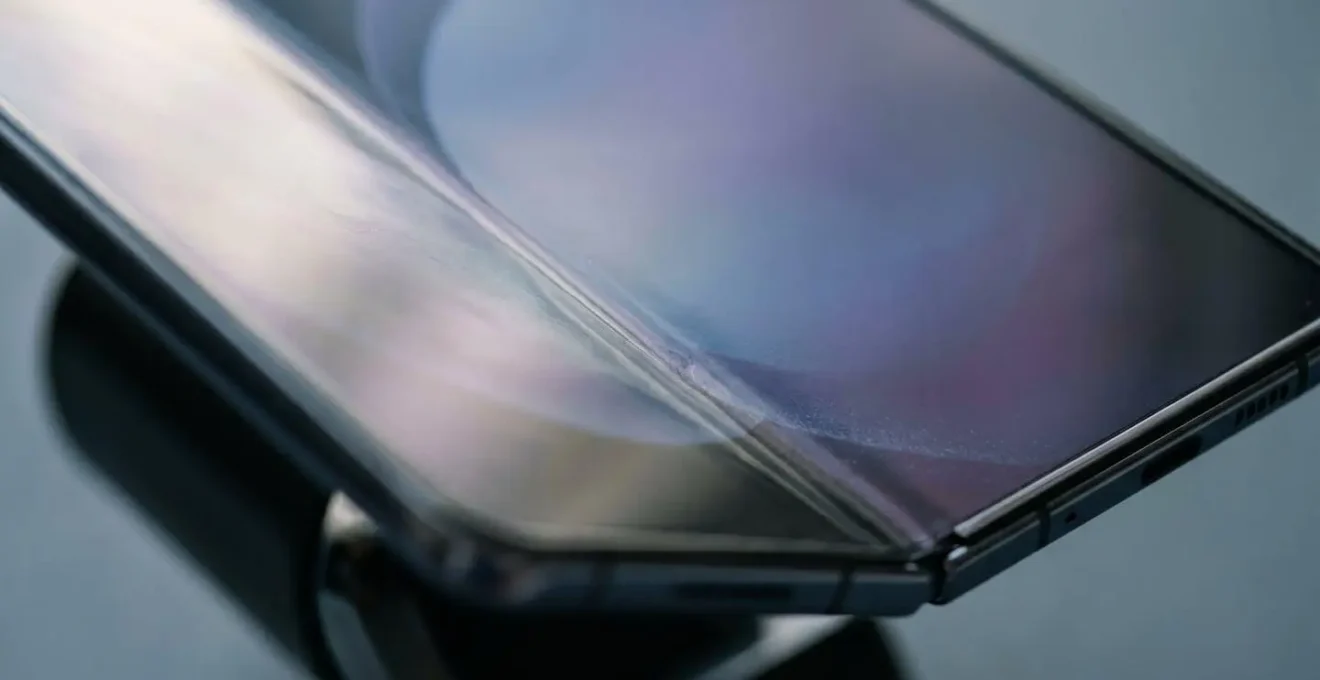
The critical flaw of a foldable phone isn’t the visible crease itself, but what it represents: a focal point for material fatigue that is highly susceptible to environmental and handling stressors.
- The crease is an unavoidable physical consequence of bending Ultra-Thin Glass (UTG), a material engineered for flexibility at the cost of inherent stiffness.
- External factors, particularly sub-zero temperatures, pose a far greater risk of catastrophic failure to the display than millions of standard fold cycles.
Recommendation: A power user should assess a foldable’s durability not by staring at the crease, but by understanding and mitigating the specific failure mechanisms related to temperature, pressure, and debris ingress.
For any power user considering a foldable phone, the central question is not one of novelty, but of endurance. The conversation inevitably lands on the crease: that subtle, yet persistent, valley running across the main display. Most reviews dismiss it with a shrug—”you get used to it”—treating it as a purely cosmetic trade-off for the expansive screen real estate. This perspective is dangerously incomplete. As hardware durability testers, we view the device not just as a user interface, but as a mechanical system under constant stress. From this objective standpoint, the crease is not an aesthetic quirk; it is a visible stress indicator, the primary point of potential failure for the entire display assembly.
The real concern isn’t whether you can see the crease, but what the crease tells you about the material science limitations of the device in your hand. It’s a window into the world of polymer chemistry, material fatigue, and stress concentration. This analysis moves beyond the surface-level debate. We will dissect the engineering principles that create the crease, the environmental factors that can lead to catastrophic failure, and the specific productivity workflows that might justify these inherent mechanical risks. The question for a heavy user is not “can I live with the crease?”, but rather “can the device’s structural integrity withstand my demanding, real-world usage?” This guide provides the data and framework to answer that question definitively.
This article provides a detailed engineering and durability assessment to help you make an informed decision. Explore the core mechanics, risks, and productivity gains that define the foldable experience for a power user.
Summary: A Hardware Durability Tester’s Guide to Foldable Phone Creases
- Why Does the Hinge Mechanism Create a Visible Line Over Time?
- How to Replace a Foldable Screen Protector Without Voiding Warranty?
- The Winter Risk: Why Foldables Crack in Sub-Zero Temperatures?
- Flip or Fold: Which Form Factor Actually Improves Productivity?
- How to Set Up App Pairs to Justify the Foldable Price Tag?
- Why Does Dark Mode Save 30% Battery on OLED but Nothing on LCD?
- Drop or Crush: Which Accident Is More Likely to Kill Your Phone?
- How to Stress Test a Phone for Construction Site Durability?
Why Does the Hinge Mechanism Create a Visible Line Over Time?
The crease on a foldable display is not a defect but a direct and unavoidable consequence of material science. The screen is made of Ultra-Thin Glass (UTG), a marvel of engineering that is, only about 30 micrometers thick, roughly a third of the thickness of a human hair. To achieve this flexibility, the material’s composition is fundamentally altered. Standard glass has a high Young’s Modulus, a measure of stiffness, making it rigid and brittle. For UTG, engineers must reduce this stiffness to allow bending without shattering.
This is where the concept of material fatigue comes into play. Every time you open and close the phone, the glass at the fold line is put under tension and compression. While the UTG is designed to withstand hundreds of thousands of these cycles, the repeated stress causes microscopic changes in the material structure. The visible crease is the macroscopic result of this accumulated stress. It’s a permanent deformation, a physical memory of every fold the device has endured. The hinge mechanism itself, designed to control the bending radius, ensures the stress is always concentrated along the exact same line, making the formation of a crease inevitable.
Case Study: The Science of Flexibility
To understand the engineering behind the crease, a foundational study is key. Research from Kongju National University, in collaboration with Samsung Display, provides deep insight. The team discovered that by substituting certain components (SiO2 with B2O3 and P2O5) in the glass formula, they could significantly lower its stiffness. Their work demonstrated that a reduction in Young’s modulus from 72 GPa to 53 GPa dramatically improved the glass’s bending characteristics. This engineering choice allows the screen to fold, but it’s also the very reason the material is soft enough to develop a permanent crease over time—it’s a calculated trade-off between flexibility and rigidity.
Therefore, viewing the crease as a simple line is a mistake. From a durability perspective, it is a stress concentrator. Any future impacts or pressure on the display will be most critical along this pre-weakened line. The deeper the crease becomes over time, the more it indicates the progression of material fatigue, bringing the display closer to its eventual failure point.
How to Replace a Foldable Screen Protector Without Voiding Warranty?
The screen protector on a foldable phone is not an optional accessory; it’s a critical structural component. This thin polymer layer serves as the first line of defense, absorbing micro-scratches and distributing pressure across the delicate Ultra-Thin Glass beneath. However, because it is also subjected to the same folding stress as the screen, it is often the first part to fail. Bubbling, lifting, or cracking along the crease are common points of failure, and attempting a DIY replacement is fraught with risk. Manufacturers are clear: improper removal can damage the display and will void the warranty, leaving you with a potentially expensive repair bill.
The cost of an out-of-warranty flexible screen replacement can be staggering, with some reports citing figures as high as $599 for the main display. Given these stakes, the only recommended procedure is to go through an authorized service center. They have the specialized tools, clean-room environments, and training to remove the old protector and apply a new one without introducing dust or damaging the OLED panel. For many first-generation and even later models, manufacturers often offer one or two free screen protector replacements within a certain period, acknowledging that this is a consumable part.
The key takeaway is to treat the pre-installed screen protector as part of the display itself. While you cannot replace it yourself, you can take steps to maximize its lifespan:
The degradation of the protector’s adhesive along the crease, as shown above, is a primary failure mechanism. To prolong its life, focus on handling and environmental control. Avoid forcefully snapping the phone shut, as this creates a pressure shockwave. Regularly clear dust from the hinge area with a soft air blower, not compressed air which can force particles deeper. Finally, charging the phone in an open position can reduce heat stress on the adhesive, preventing premature bubbling and delamination. These small habits are crucial for maintaining the integrity of this vital component.
The Winter Risk: Why Foldables Crack in Sub-Zero Temperatures?
While manufacturers extensively test fold cycles, one of the most significant real-world threats to a foldable phone is not mechanical wear but thermal shock. Specifically, extreme cold represents a critical failure vector for the polymer-based screens and protectors. The materials used in a flexible display have a property known as the Glass Transition Temperature (Tg). Below this temperature, the normally pliable and rubber-like polymer becomes hard, rigid, and brittle, like glass. Attempting to fold or unfold the device in this brittle state can lead to immediate and catastrophic failure.
This is not a theoretical risk. It’s a well-documented phenomenon. The official operating guidelines for most foldable devices reflect this vulnerability. For instance, the manual for the Galaxy Z Fold 2 specifies a safe ambient temperature range for operation. According to documentation, the recommended range is between 0°C and 35°C (32°F to 95°F). Using the device, and especially actuating the hinge, outside of this range puts the screen materials under stress they were not designed to handle. When the polymer screen is below its Tg, the energy from the bending motion can’t be dissipated through flexing. Instead, it concentrates into a fracture, causing the screen to crack.
Case Study: The South Korean Deep Freeze of 2021
A stark real-world example occurred in South Korea during a cold snap in January 2021. As temperatures plummeted to -18°C (-0.4°F), numerous owners of Samsung’s foldable devices began reporting sudden screen failures. The pattern was consistent: users who tried to unfold their phones after being outside in the extreme cold were met with displays that immediately developed black spots, bright lines, or became completely unresponsive. The damage was internal to the OLED panel, occurring without any drop or impact. This cluster of incidents provided definitive proof that the material properties of the flexible display change drastically in sub-zero conditions, making them extremely fragile.
For a power user in a cold climate, this is a non-negotiable consideration. If your daily routine involves moving between a warm office and a freezing exterior, you must allow the phone to warm up to room temperature before attempting to unfold it. Tucking it into an inside pocket close to your body can help maintain it within a safe operating temperature. Ignoring this environmental constraint is one of the fastest ways to destroy a foldable screen.
Flip or Fold: Which Form Factor Actually Improves Productivity?
The foldable market has bifurcated into two distinct form factors, each with a different value proposition. The “Flip” style, which folds vertically into a compact square, prioritizes portability and nostalgia. It offers a large screen that disappears into a small package. The “Fold” style, which opens horizontally like a book, prioritizes productivity and multitasking. It transforms a standard-sized phone into a small tablet. For a power user concerned with utility, the choice is clear: the Fold form factor is the only one that fundamentally changes how work is done on a mobile device.
The Flip’s primary function is to make a big phone small. While its cover screen has become more useful for notifications and quick replies, its core use case remains single-app consumption on a large display. The Fold, however, is built for production. Its larger, squarer aspect ratio when unfolded is not just for watching videos; it’s a canvas designed for split-screen applications, drag-and-drop functionality, and simultaneous information display. This is where the hardware begins to justify its price and its inherent durability compromises.
As the image illustrates, the true power of the Fold is unlocked when it’s used as a multitasking hub. The ability to have a reference document open on one half of the screen while composing an email on the other, or to participate in a video call while taking notes in the same interface, is a paradigm shift from traditional smartphone usage. This isn’t just a bigger screen; it’s a dual-screen workspace that fits in your pocket. As one industry expert noted, the device’s value lies in this transformation.
The Galaxy Z Fold isn’t just a phone that opens wider—it’s a different kind of device altogether. It changes how you work, not just how you scroll.
– David Pierce, Editor-at-Large at The Verge
For a heavy user, the decision hinges on this question: do your daily tasks benefit from simultaneous app usage? If your workflow is primarily sequential, involving one app at a time, the Fold’s advantages are minimized. But if you constantly switch between apps to cross-reference information, the Fold offers a genuine, tangible improvement in efficiency that no single-screen device can match.
How to Set Up App Pairs to Justify the Foldable Price Tag?
The single most compelling feature that validates the “Fold” form factor’s premium price is its advanced multitasking capability, specifically through “App Pairs.” This feature allows you to save a customized split-screen layout of two or three apps that can be launched together with a single tap. This moves beyond simple split-screen and into the realm of creating bespoke productivity workflows. Mastering App Pairs transforms the device from a novelty into a purpose-built efficiency tool. The underlying technology, such as Samsung’s Multi-Active Window, enables you to run up to three apps simultaneously with resizable panels, but its true power is only realized through thoughtful configuration.
Setting up an App Pair is straightforward. You arrange the apps you want in a split-screen view, tap the divider between them, and select the option to add the pair to your home screen or edge panel. The strategic value lies in identifying the repetitive, high-friction tasks in your daily routine and creating pairs to eliminate those pain points. Instead of constantly switching between your calendar and email to schedule a meeting, create a pair. Instead of toggling between a spreadsheet and a calculator, create a pair. The goal is to identify and automate any workflow that requires cross-referencing information between two applications.
For power users, the possibilities extend far beyond basic app combinations. Creating role-specific App Pairs is the key to maximizing return on investment. Here are some advanced configurations tailored to different professional needs:
- Content Creator workflow: Pair a video editing timeline app (like LumaFusion) with a file manager (My Files) for quick media asset access and drag-and-drop functionality into the timeline.
- Sales Professional setup: Combine a CRM platform (like Salesforce) with LinkedIn to research prospects on one side while updating contact records and logging calls in real-time on the other.
- Developer environment: Configure a code editor (like VS Code) alongside a terminal or logcat viewer to monitor application behavior and debug issues while actively coding.
- Project Manager pairing: Use Microsoft Word or Excel for document editing on one pane with Samsung Notes or OneNote on the other for annotating and capturing meeting insights.
– Financial Trader configuration: Set up a charting application with a live news feed (like Bloomberg or Reuters) for simultaneous market analysis and breaking information monitoring.
By investing a small amount of time to build a library of these custom workflows, a power user can achieve significant efficiency gains. It’s this level of personalized utility that begins to balance the scales against the device’s cost and inherent durability concerns.
Why Does Dark Mode Save 30% Battery on OLED but Nothing on LCD?
A power user’s quest for maximum efficiency extends to battery life, and this is where the specific technology of a foldable’s screen becomes critically important. Foldable phones exclusively use OLED (Organic Light-Emitting Diode) displays, and understanding how they work is key to optimizing battery performance. The dramatic battery savings of Dark Mode on an OLED screen—often cited as up to 30%—is not a software trick; it’s a direct result of the hardware’s fundamental design.
An LCD (Liquid Crystal Display) screen, found on many traditional phones and monitors, works using a single, powerful backlight. This light is always on when the screen is active, shining through a series of filters and liquid crystals to create the colors you see. To display a black pixel, the crystals must work to block the backlight as much as possible, but some light still leaks through, and the backlight itself is still consuming full power. In short, on an LCD, displaying black consumes almost as much energy as displaying white.
OLED technology is completely different. As the name implies, each individual pixel is a tiny light-emitting diode that produces its own light. There is no backlight. To display a bright color, a pixel lights up and consumes power. To display black, the pixel simply switches off completely. It consumes zero power. This difference is starkly illustrated in the comparison above: one side is fully illuminated, drawing significant power, while the other uses energy only for the specific points of light it needs.
This is why Dark Mode is so effective on a foldable’s OLED screen. Every black pixel in the user interface is a pixel that has been turned off, saving energy. The more black on your screen, the less power the display draws from the battery. For a power user who spends hours on their device, switching to Dark Mode is not just an aesthetic choice; it is a strategic decision to leverage the physical properties of the display hardware for tangible gains in longevity and performance.
Drop or Crush: Which Accident Is More Likely to Kill Your Phone?
For a traditional “candy bar” smartphone, the most feared accident is a drop onto a hard surface, leading to a shattered screen. For a foldable phone, however, the calculus of risk is different. While drop protection has improved with stronger frames and more resilient Ultra-Thin Glass, a more insidious and potentially fatal threat is pressure, or a crushing force. The complex mechanical nature of the hinge makes the device uniquely vulnerable to this type of damage.
A standard phone is a solid-state slab. A foldable is a complex assembly of gears, plates, and flexible electronics. While manufacturers certify their hinges for a high number of fold cycles, such as Samsung’s claim of durability for 200,000 folds in laboratory conditions, these tests do not account for torsional stress or direct pressure. Sitting on your phone, having it squeezed in a tight bag, or even gripping it too hard in the wrong place can exert forces that the intricate hinge mechanism is not designed to withstand. This can lead to misalignment, seizure, or damage to the delicate ribbon cables that run through the hinge.
Repairability Analysis: A New Failure Vector
The unique vulnerability of foldables to pressure is a key finding in repairability assessments. According to analysis from industry experts like iFixit, the very complexity that enables the device to fold also introduces new failure modes. Their teardowns reveal that while drop resistance is often addressed, the hinge remains a weak point for pressure and torsional stress. The process of repairing any component on a foldable requires careful disassembly of glued panels, and the hinge is a particularly sensitive area. Unlike a simple drop impact, sustained pressure can cause subtle, non-obvious damage that leads to a delayed failure of the folding mechanism or display.
Therefore, for a foldable power user, the threat model must be updated. While drops are still a concern, the greater and more unique risk is crush damage. You are more likely to kill your foldable phone by accidentally sitting on it than by dropping it from waist height. This requires a change in user behavior: being mindful of where the phone is placed, avoiding tight back pockets, and understanding that the device’s mechanical heart—the hinge—is also its Achilles’ heel when it comes to pressure.
Key Takeaways
- The crease is a physical indicator of material fatigue, not just a cosmetic flaw.
- Cold temperatures below 0°C (32°F) can make the screen brittle and cause catastrophic failure upon unfolding.
- For productivity, the “Fold” form factor’s multitasking capabilities are superior to the “Flip’s” portability focus.
How to Stress Test a Phone for Construction Site Durability?
For a power user whose “office” is a dynamic and hazardous environment like a construction site, standard durability claims are insufficient. You need to know how a device, particularly a mechanically complex one like a foldable, will hold up against dust, vibration, and rough handling. Official specifications provide a baseline. For instance, the latest foldables often boast an IP48 rating, which indicates a high level of dust protection and water resistance. However, these ratings are achieved in controlled lab environments and don’t fully capture the chaotic reality of a job site.
A true stress test for this environment must go beyond the specs and simulate real-world conditions. The hinge mechanism is the primary area of concern. While sealed against large particles, fine-grain construction dust (like drywall or concrete dust) is pervasive and abrasive. A single particle entering the hinge can act like a piece of grit in a precision machine, causing grinding, accelerated wear, or complete seizure. Similarly, constant high-frequency vibrations from power tools or heavy machinery can potentially loosen internal components or affect sensitive systems like the camera’s optical image stabilization.
To properly evaluate if a foldable is suitable for such an environment, you must conduct a “gauntlet” test that targets its specific vulnerabilities. This goes beyond simple drop tests and focuses on the persistent, grinding realities of a construction site. The goal is to identify failure points before they impact your work.
Action Plan: The Construction Site Gauntlet Test
- Pocket Dust Test: Before taking it to a live site, seal the phone in a ziplock bag with a teaspoon of fine sand or dirt. Shake gently for 30 seconds, then remove, clean the exterior, and carefully inspect the hinge mechanism and ports for any signs of dust ingress.
- Vibration Resistance Test: Place the phone (in a protective case) on the handle of an operating but stationary power tool (like a sander or generator) for 5 minutes. Afterward, test the camera’s ability to focus quickly and check for any new sounds or resistance in the hinge action.
- Gloves UI Test: While wearing a pair of standard, non-specialized work gloves (e.g., leather or canvas), attempt to answer an incoming call and navigate to a specific app. This tests the screen’s touch sensitivity and whether it’s practical for quick use without removing protective gear.
- Port Protection Verification: Place the phone near, but not touching, a small pile of fine metal filings or shavings. Use a magnetic-tipped tool to check if any filings are drawn towards the charging or speaker ports, which could indicate a risk of conductive particle intrusion.
- Sunlight Legibility Check: View the screen, particularly with complex documents like blueprints or spec sheets, under direct midday sunlight at maximum brightness. Confirm that the display is legible enough for critical outdoor operation without constantly seeking shade.
Running through this checklist provides a much more realistic assessment of a foldable’s field-worthiness than any marketing material. It shifts the evaluation from passive specifications to active, scenario-based testing, which is the only way to determine true durability for a demanding power user.
Ultimately, the decision to adopt a foldable comes down to a personal calculation of risk versus reward. By understanding the engineering trade-offs, environmental vulnerabilities, and specific productivity gains, you are now equipped to make that calculation not as a consumer, but as an informed power user. Evaluate your daily workflow and environment against these durability benchmarks to determine if this technology is a revolutionary tool or an expensive liability.