In summary:
- Effective remote heating control is not about a single device, but an integrated smart home “ecosystem” that works together.
- Before investing in new tech, use data from smart meters and even your phone’s LiDAR to find and fix costly heat loss areas.
- Automate your savings with proactive tools like “goodbye” scenes and geofencing to ensure you only heat your home when necessary.
The feeling is all too familiar for UK homeowners: you open your winter energy bill, and the number makes your stomach drop. In response, most advice centres on reactive, manual adjustments: turn down the thermostat by a degree, put on a jumper, or buy a well-known smart thermostat like a Nest or Hive. While these steps have their place, they often miss the bigger picture. They treat your home’s heating as an isolated problem to be managed, rather than a system to be optimised.
The true power of remote control isn’t just about turning the heating off from the supermarket. It’s about building a proactive, intelligent home ecosystem that anticipates your needs, eliminates waste, and makes decisions based on data, not guesswork. This involves understanding how your devices communicate, ensuring they are safe, and using advanced tools—some of which are already in your pocket—to diagnose and solve the root causes of high energy consumption. It’s a shift from merely controlling your heating to truly managing your home’s energy performance as a whole.
This guide will walk you through the essential components of creating that cost-saving ecosystem. We will explore how to build reliable smart scenes, why safety is a crucial economic decision, and how to leverage cutting-edge tech like geofencing and LiDAR to take your energy management from basic to expert level, delivering tangible savings on your bills.
Summary: A Complete Strategy for Remote Heating Control and Savings
- Why Do Your Smart Lights Lag When the Internet Is Slow?
- How to Turn Off Everything in Your House With One Tap?
- The Fire Safety Risk of Non-Certified Smart Plugs in UK Homes
- Matter or HomeKit: What Should You Buy for a Future-Proof Home?
- How to Use Geofencing to Heat Your Home Only When You Are Near?
- Smart Plug or Optimised Charging: Which Saves More Energy?
- The Measuring Mistake That Could Cost You £500 in Flooring
- How to Use LiDAR Depth Models for UK Home Renovations?
Why Do Your Smart Lights Lag When the Internet Is Slow?
Your journey into remote heating control often starts with other smart devices, and you may have noticed a frustrating issue: when your Wi-Fi is sluggish, your smart lights become unresponsive. This isn’t just an inconvenience; it reveals a fundamental weakness in many smart home setups that can directly impact the reliability of your heating control. The problem lies in a dependency on the cloud. Many Wi-Fi-based smart devices, including some thermostats, need to send a command from your phone, to a server on the internet, and then back to your home. If any part of that chain is slow or broken, nothing happens.
This highlights the importance of building a robust local network for your smart home ecosystem. Technologies like Zigbee and Thread create their own low-power mesh network within your home. Devices can talk directly to each other without needing to go through your router or the internet for basic commands. This means your “turn off heating” command works instantly, even if Netflix is buffering or your broadband is down.
Think of it as the difference between having a conversation with someone in the same room versus shouting to them from across a busy street. A local network is direct, fast, and reliable. When choosing smart devices, especially for critical systems like heating, prioritising those that support local control protocols is the first step towards a system that is not just smart, but also resilient and dependable. This foundation is crucial for the more advanced automation we will explore.
Ultimately, a system that works offline is a system you can trust, which is the bedrock of effective and stress-free home energy management.
How to Turn Off Everything in Your House With One Tap?
The real power of a smart home isn’t controlling one device at a time; it’s orchestrating them all to work together. This is achieved through “scenes” or “routines”—pre-programmed sequences that activate multiple devices with a single command. The most powerful of these for saving money is the “Goodbye” or “Away” scene, designed to power down your home’s energy consumption the moment the last person leaves.
Instead of manually turning down the thermostat, switching off lights, and unplugging appliances, you can create a single tap on your phone (or an automated trigger) that does it all. A well-configured away routine is a cornerstone of proactive energy management. It eliminates the human error of forgetting to turn things off and ensures your home enters an energy-saving state consistently. As Energy UK reports show, up to 86% of smart meter users reduced their energy usage simply by being more aware and changing habits; automation makes these changes effortless.
A truly effective “Goodbye” routine goes beyond just lights and plugs. It should intelligently manage your heating for maximum efficiency:
- Thermostat Setback: Rather than turning the heating completely off, set it to a lower “setback” temperature (e.g., 14-16°C). This prevents the house from getting excessively cold, reducing the risk of dampness and requiring less energy to heat back up than starting from a very low temperature.
- Frost Protection: Include a rule to automatically cycle the heating if the internal temperature drops to a critical level (e.g., 5-7°C), protecting your pipes during winter holidays.
- Security Integration: For longer absences, your scene can randomly activate lights to simulate occupancy, enhancing security without significant energy cost.
By bundling these actions into one trigger, you transform your smart devices from individual gadgets into a cohesive, cost-cutting system that works for you automatically.
The Fire Safety Risk of Non-Certified Smart Plugs in UK Homes
In the quest to save money, it’s tempting to reach for cheap, non-certified smart plugs to control appliances like portable heaters. This is a critical mistake that can turn a cost-saving measure into a catastrophic financial and safety risk. Electrical safety is not a corner to be cut. In fact, London Fire Brigade data shows 236 heating-related fires in just one recent year, with a significant portion caused by faulty appliances and electrical components. Using a plug that isn’t certified to UK standards (like BS 1363 and UKCA marking) with a high-power device like a heater is playing with fire.
These uncertified plugs often lack proper overload protection, use substandard materials, and are not designed to handle the sustained high current that a heater draws. This can lead to overheating, melting, and ignition. The perceived saving of £10 on a plug is insignificant compared to the potential cost of a house fire. True cost-saving is about smart risk management, and this is a risk no homeowner should take.
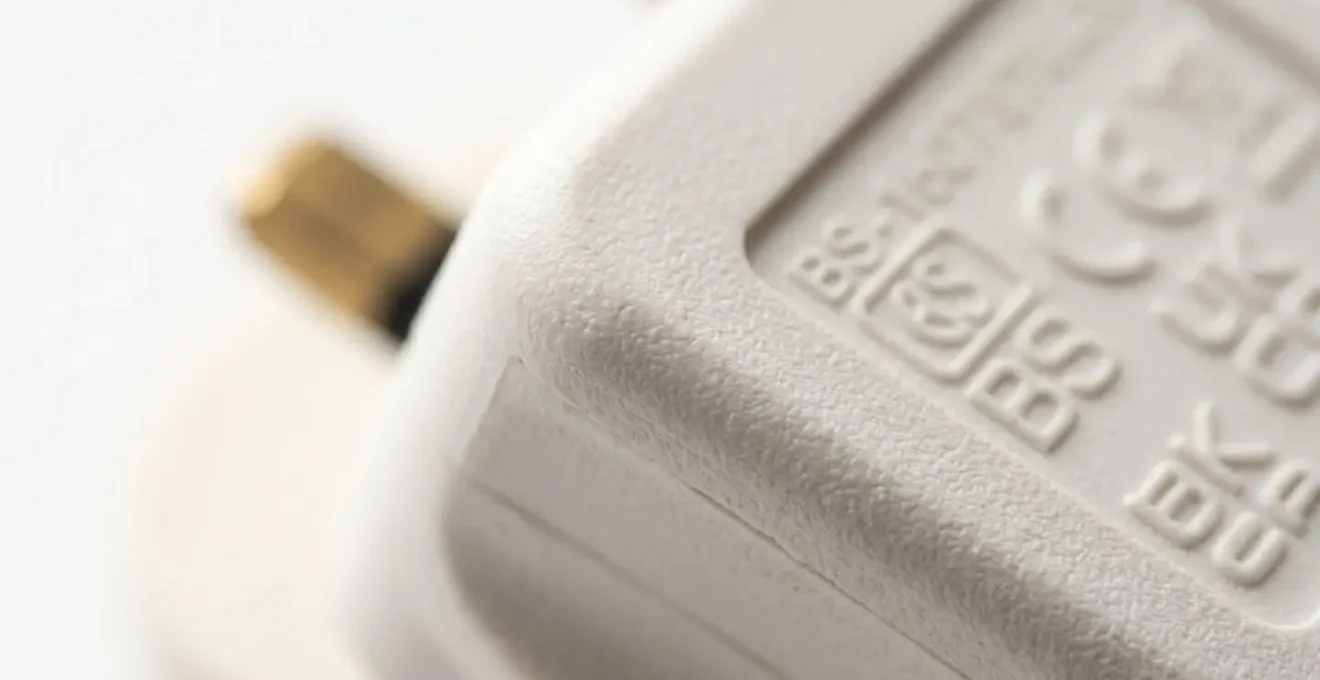
As the image highlights, official certification marks are a sign of quality and safety testing. Always look for these markings when purchasing any electrical equipment. For controlling heating specifically, there are much safer and more effective alternatives than a standard smart plug. Your choice should depend on your specific heating system and goals.
To make an informed and safe decision, it’s essential to understand the correct tools for the job. The following table compares safe, certified methods for smart heating control in UK homes.
| Solution | Power Rating | Installation | Typical Cost (UK) | Safety Features | Best For |
|---|---|---|---|---|---|
| High-power smart plug (15A) | Up to 3,600W | DIY plug-in | £40-£80 | Overload protection, certification required (BS 1363, UKCA) | Occasional use with certified heaters |
| Smart Thermostatic Radiator Valve (TRV) | Controls existing radiator | DIY replacement | £50-£120 per valve | No electrical load, temperature limiting | Room-by-room zonal heating control |
| Professionally installed smart relay | Up to boiler capacity | Gas Safe engineer required | £150-£300 installed | Integrated boiler protection, certified installation | Whole-home heating automation |
Investing in the right, certified equipment isn’t an expense; it’s an insurance policy against a far greater loss, making it a core principle of intelligent energy management.
Matter or HomeKit: What Should You Buy for a Future-Proof Home?
As you build your smart home ecosystem, you’ll encounter terms like Matter, HomeKit, Alexa, and Google Home. It’s easy to get confused, thinking you have to choose one “team.” This is a common misconception. The key to a future-proof home is understanding the difference between a platform (like Apple’s HomeKit) and a standard (like Matter). HomeKit is an app and a framework for controlling devices; Matter is the universal language that allows devices from different brands to speak to each other reliably.
Choosing Matter is not about abandoning HomeKit or Alexa; it’s about ensuring the devices you buy today will work with any platform you choose tomorrow. It breaks down the “walled gardens” where a Google device wouldn’t talk to an Apple one. This interoperability is the backbone of the truly integrated, cost-saving ecosystem we aim to build. As recent certification reports indicate over 190 products are already certified or in the queue, showing massive industry momentum.
Case Study: The Rapid Rise of Matter
In recent years, Matter saw huge adoption from both professional and consumer brands. Industry giants like ABB and consumer-friendly brands like IKEA (offering Matter devices for under £10) have driven its implementation. Crucially, updates to the underlying Thread network protocol resolved early stability issues, while new versions of the Matter specification have expanded its scope to include essential energy management devices, including cameras and heating controls. This means all major platforms—Google Home, Apple HomeKit, Amazon Alexa, and Samsung SmartThings—now support a growing universe of cross-compatible devices, making it easier than ever to build a cohesive smart home.
For a UK homeowner, this means you can buy a Matter-certified smart radiator valve from one brand and be confident it will work with a Matter-certified thermostat from another, all controlled within your preferred app, like Apple Home. It provides investment protection, ensuring your smart home doesn’t become obsolete if you switch phone brands or if a manufacturer goes out of business. For a truly future-proof and flexible system, the strategy is simple: prioritise devices that carry the Matter logo.
This approach guarantees a more resilient, versatile, and ultimately more cost-effective smart home for years to come.
How to Use Geofencing to Heat Your Home Only When You Are Near?
Of all the smart heating features available, geofencing offers one of the most powerful and seamless ways to cut energy waste. In simple terms, geofencing uses your phone’s location to create a virtual boundary around your home. When you cross this boundary on your way back, it automatically triggers your heating to turn on, ensuring the house is warm by the time you arrive. When the last person leaves, it automatically switches the heating to your energy-saving “away” mode. It is the ultimate form of proactive control, eliminating the need to remember to adjust the thermostat.
This isn’t just about convenience; it’s about precision. A fixed schedule might heat an empty house if you decide to stay late at work, or leave you coming home to a cold one if you leave early. Geofencing adapts to your actual life, ensuring you are never heating an empty home. This dynamic adjustment is where the real savings are found, as you’re only paying for the comfort you actually use.

Setting up geofencing effectively requires a little customisation based on your routine and location. A one-size-fits-all approach won’t be optimal. For UK commuters, tailoring the settings can make a huge difference:
- London Underground Users: Set a tight geofence radius (e.g., 500 metres) around your home tube station. This triggers the heating as you emerge from the station, giving it just enough time to warm up for your arrival.
- Motorway Commuters (M25, M6): If you have a long drive, use a larger radius (e.g., 2-5 kilometres). Some advanced apps even incorporate traffic data to predict your arrival time and optimise the heating start time accordingly.
- Multi-Person Households: Ensure your system is configured with “last person to leave, first person to arrive” logic, so the heating doesn’t turn off when only one person pops out to the shops.
- Prevent Short-Cycling: Set a minimum “away time” (e.g., 30 minutes) to prevent the system from turning off and on again if you just run a quick local errand.
By fine-tuning your geofence, you transform your thermostat from a simple timer into an intelligent assistant that actively manages your energy consumption based on your real-world movements.
Smart Plug or Optimised Charging: Which Saves More Energy?
Many people use smart plugs to cut “vampire drain”—the small amount of power that electronics consume in standby mode. While this can save a few pounds a year, it often overlooks a much larger opportunity for savings: optimising when you consume high amounts of energy. The focus shouldn’t just be on *if* a device is on, but *when* it’s on. This is where smart “Time of Use” tariffs, enabled by your smart meter, come into play.
These tariffs offer cheaper electricity during off-peak hours (typically overnight). Instead of using a smart plug to simply cut power to a device charger after it’s full, a more powerful strategy is to use your device’s built-in “optimised charging” feature to ensure it only draws significant power during these cheap-rate periods. This applies not just to your phone but increasingly to electric vehicles and home battery systems. The principle is to shift your largest energy loads away from expensive peak times. This philosophy is endorsed at the highest levels of UK energy policy.
Smart ‘time of use’ tariffs incentivise consumers to save money by using energy away from peak times and enable technologies such as electric vehicles and smart appliances to be cost-effectively integrated with renewable energy sources.
– UK Department for Energy Security & Net Zero, Smart Metering Implementation Programme Costs and Benefits Report 2024
The savings from behavioural changes prompted by smart meter data are well-documented. For instance, a comprehensive evidence review by the Behavioural Insights Team found that smart meters save an average of 3.4% of electricity and 3.0% of gas consumption. Optimised charging leverages this data to automate savings. So, while a smart plug can help with vampire drain, focusing on shifting large loads to off-peak hours delivers far more significant financial benefits and is a smarter overall energy strategy.
The choice is clear: while smart plugs offer marginal gains, aligning your energy use with optimised charging and Time of Use tariffs represents a strategic leap in cost reduction.
Key takeaways
- True savings come from an integrated home “ecosystem,” not a single smart thermostat.
- Prioritise safety and certification with all electrical devices; a cheap plug can lead to catastrophic costs.
- Make data-driven decisions: measure your home’s heat loss before you invest in expensive smart heating controls.
The Measuring Mistake That Could Cost You £500 in Flooring
The title of this section might seem odd. What does flooring have to do with heating control? The connection lies in a common and costly mistake: investing in smart technology before addressing the fundamentals of your home’s thermal efficiency. Imagine spending £500 on a state-of-the-art smart heating system for a room, only to find your bills are still high because the heat is escaping through draughty floorboards, single-glazed windows, or an uninsulated loft. The “measuring mistake” is not measuring for a new carpet; it’s failing to measure where your heat is going.
Pouring money into smart controls for a poorly insulated room is like trying to fill a leaky bucket with a high-tech hose. You’re just wasting energy more efficiently. The most cost-effective approach is always to insulate first, control second. As the Energy Saving Trust estimates, homeowners in Great Britain can save around £110 per year just by installing and using heating controls effectively, but this figure assumes a reasonably well-insulated property. In a leaky home, the potential savings are drastically reduced.
Before you buy any new smart thermostat or radiator valve, your first step should be a basic heat loss audit. This data-driven approach allows you to prioritise your spending where it will have the most impact. You don’t need to be an expert to get a good initial assessment.
Your Action Plan: Basic Home Heat Loss Audit
- Measure room dimensions: Record the length, width, and ceiling height of key rooms in metres.
- Calculate glazed area: Measure the size of all windows and external doors to understand heat loss points.
- Use a free online calculator: Input your measurements into a UK-specific heat loss calculator to get an estimated heating requirement (in kW or BTUs) for each room.
- Identify high-loss zones: The rooms with the highest required heating power are your priority areas for insulation investment.
- Compare ROI: For each high-loss room, weigh the return on investment between draught-proofing, insulation upgrades, and new smart controls.
By taking these measurements, you ensure your investment in smart technology will deliver the savings it promises, rather than just masking a more fundamental problem.
How to Use LiDAR Depth Models for UK Home Renovations?
The principle of “measure first, spend second” can now be taken to an entirely new level of precision using technology you may already have: the LiDAR scanner in modern smartphones. LiDAR (Light Detection and Ranging), found on recent iPhone Pro models and some Android devices, can create surprisingly accurate 3D models of your rooms. This opens up powerful, data-driven possibilities for UK homeowners planning renovations to improve energy efficiency.
With the infrastructure to support these data-heavy applications now widespread—Ofcom’s Connected Nations report shows that as of 2024, nearly 7 in 10 UK homes have access to full-fibre broadband—using these tools is more practical than ever. The process provides a powerful way to visualise and quantify heat loss, turning abstract concepts into tangible data you can act upon. This approach is particularly effective for assessing the impact of renovations on your home’s energy performance.
Case Study: Pinpointing Thermal Leaks with LiDAR
By combining a phone’s LiDAR scan with an affordable thermal camera dongle (costing £200-£400), a homeowner can create a 3D thermal map of their home. This model precisely highlights the “cold spots” where heat is escaping—around window frames, under skirting boards, or through poorly insulated wall sections. This technique allows for a clear “before and after” comparison of an insulation project. You can visually demonstrate the effectiveness of new cavity wall insulation or loft insulation, providing tangible proof of your investment. This data can also be invaluable for understanding and potentially challenging your property’s Energy Performance Certificate (EPC) rating, identifying the most cost-effective renovations to move from a D or E rating to a more valuable B or C.
This method transforms home renovation from guesswork into a calculated, scientific process. It allows you to target your budget with surgical precision, ensuring every pound spent on upgrades delivers a measurable return in energy savings and increased property value. It represents the pinnacle of a data-driven approach to home energy management, using advanced tools to make the smartest financial decisions.
Start by auditing just one room using these principles. Your journey to a smarter, more cost-effective home begins with a single, data-driven decision, proving that the best way to control your heating is to first understand your home.